Why do warehouse automation projects fail? In 2026, the answer is rarely just a faulty robot or a missed delivery date. Projects stumble when automation is planned around an ideal workflow, while the real warehouse handles split cases, late replenishment, changing SKU sizes, and rush orders. A conveyor may run smoothly in a demonstration, then stop repeatedly when cartons arrive crooked or labels cannot be read. Small exceptions become expensive bottlenecks.
Operations management expert W. Edwards Deming offered a useful warning: “A bad system will beat a good person every time.” His systems principle applies directly to warehouse automation. Technology cannot repair unclear ownership, poor inventory data, or a process nobody has tested under peak conditions. The warning is simple. The remedy is not.
A reliable project begins with measured baseline data: order profiles, travel distances, error rates, and peak-hour volumes. Teams should test real exceptions, confirm that warehouse software exchanges accurate data, and involve frontline workers before final designs are locked. A phased pilot can expose problems while changes are still manageable. Yet even careful plans miss things; that deserves honest review, not a tidy success story. Leaders should track uptime, throughput, labor impact, and recovery time after faults—not just equipment speed. This guide examines the practical causes behind failure, the warning signs teams often overlook, and the decisions that make automation more dependable. The goal is not to automate everything. It is to build a system that works on an ordinary, messy Tuesday.
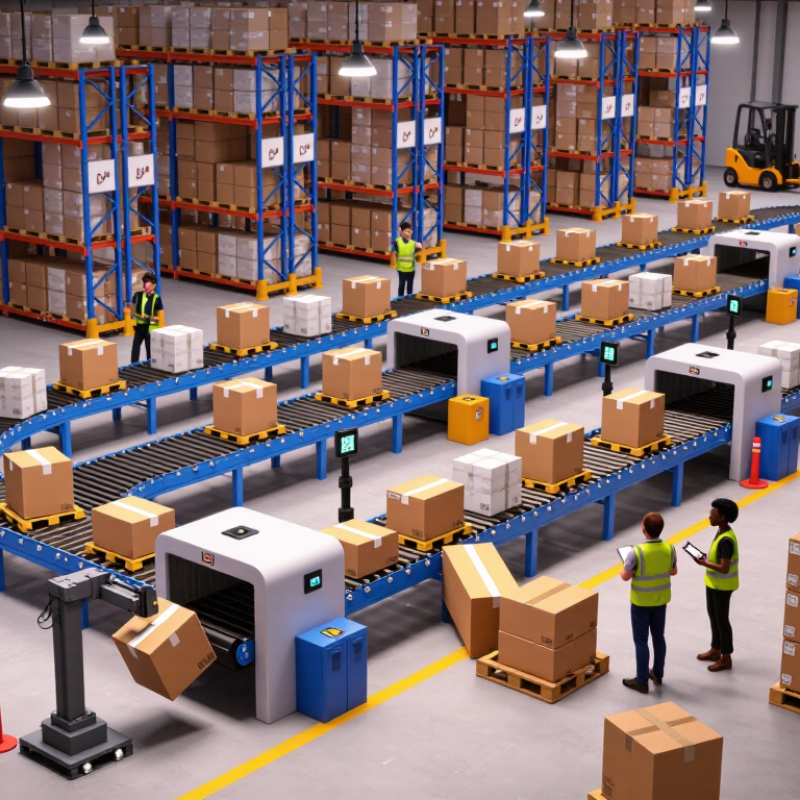
Warehouse automation goals should describe an operational change, not a purchase. “Install robots” is a scope item; “cut peak-shift order cycle time by 15% without reducing accuracy” is a measurable goal. Gartner forecast that 75% of large enterprises would adopt some form of intralogistics smart robots by 2026. Adoption, however, is not proof of value. A busy warehouse can automate the wrong bottleneck and simply move the queue.
Set a baseline before selecting equipment: orders per labor hour, picking accuracy, replenishment delays, and peak-volume backlog. Then define the pilot area, product mix, shift coverage, integration limits, and who owns exceptions when a tote misses its route. The MHI 2024 Annual Industry Report found that 55% of respondents planned to invest more than $1 million in supply chain innovation over the next two years. That is not ROI. Link each investment to a target, a measurement period, and an agreed data source. Track safety and downtime alongside throughput; otherwise, a faster system may hide new costs. Keep the first scope narrow enough to learn. Not too narrow, though: a pilot that excludes peak demand can look successful and still mislead the team. Revisit the targets after real operating weeks, because initial assumptions are often imperfect.
Warehouse automation projects often fail because operational readiness is mistaken for buying equipment. A system may move cartons quickly in a demo, yet stall when labels are damaged, stock records drift, or aisles fill with returns. Before selecting technology, map the actual work across a full shift, including exceptions and handoffs. Ask operators where delays occur and how often they rework orders. Small details matter. A scanner that struggles with glare can slow an entire packing lane.
Technology fit depends on the building, products, and people who will use it. Check ceiling height, floor condition, Wi-Fi coverage, order variability, and peak-season volume. Compare these limits with the system’s real operating range, not only its advertised capacity. Set measurable targets for throughput, accuracy, downtime, and recovery time. Run a pilot using ordinary orders and difficult ones. A neat pilot can still hide problems; test changeovers and maintenance access, too. Readiness is not a perfect score.
Tips: Name an operations owner before installation. Train each shift, not just supervisors. Keep a manual fallback and clear escalation steps. Review exceptions weekly during rollout. If staff keep bypassing a process, pause and ask why. The technology may be fine; the workflow may not be.
Warehouse automation projects often stumble before equipment arrives. The weak point is often the plan linking workflows, software, and data. A conveyor may run perfectly while orders wait because item dimensions, location codes, or exception rules disagree. One small mismatch can stop a shift.
The 2024 MHI Annual Industry Report found that 55% of respondents planned to increase supply chain technology investment over the following year. That appetite makes disciplined planning more important, not less. Map the physical flow from receiving to packing, then assign an owner to every system handoff. Define how the warehouse management system, controls, and order systems exchange inventory status, task completion, and error messages. Otherwise, teams may discover too late that “available” means different things in different systems.
Real data is rarely tidy. Test with actual item records, awkward package sizes, split orders, and late inbound updates before final design approval. Set rules for missing dimensions and duplicate identifiers; decide who corrects them and how quickly. Run integration tests using peak-volume scenarios, not just a clean demonstration. Include operators in walkthroughs: a screen that looks logical in a meeting may add extra scans on a busy aisle. Some assumptions will be wrong. Record them, revisit them, and resist treating a successful pilot as proof that every site is ready.
Warehouse automation projects rarely fail because a conveyor moves too slowly. They struggle when plans meet a live shift: mixed cartons, blocked aisles, and late inbound trucks. Start implementation by observing real work, not just a polished demonstration. Map exceptions, peak-hour volume, and manual handoffs before finalizing equipment and software requirements. MHI’s 2024 Annual Industry Report tracks growing investment in supply-chain technologies, including robotics and automation. Investment, however, does not guarantee readiness.
Workforce change needs equal attention. The World Economic Forum’s Future of Jobs Report 2025 found that 63% of surveyed employers see skills gaps as a key barrier to business transformation. It also estimates that 39% of workers’ core skills may change by 2030. For warehouse teams, that can mean learning new interfaces, clearing robot faults, or handling exceptions safely. Train on the actual floor, across different shifts. A pilot may look successful while quietly relying on one experienced operator. That is a warning sign, not a small detail.
Tips: Involve operators in workflow tests. Provide short, repeated practice before go-live, then schedule floor support during early shifts. Track error rates and worker feedback. Revise the process when reality disagrees with the plan.
| Failure Area | Typical Warning Signs | Underlying Cause | Implementation Controls | Workforce and Training Actions | Measures to Review | When to Address |
|---|---|---|---|---|---|---|
| Unclear objectives and scope | Teams disagree on what the system must achieve; requirements keep changing; success is described only as “more automation.” | Project goals are not translated into measurable operational outcomes, constraints, and agreed acceptance criteria. | Document the target processes, operating assumptions, exclusions, service requirements, and acceptance tests before design approval. Assign an accountable decision-maker for scope changes. | Include supervisors and affected employees in process reviews so documented requirements reflect actual work, exceptions, and safety needs. | Approved requirements; unresolved decisions; change requests; acceptance-test results against the agreed criteria. | Before procurement and throughout design |
| Inaccurate process and data assumptions | Actual order profiles, inventory locations, item dimensions, or exception rates differ from planning assumptions. | Design decisions rely on incomplete, outdated, or averaged data rather than representative operating conditions. | Validate order, inventory, SKU, travel, and exception data. Test peak periods and unusual but common workflows; document data owners and refresh rules. | Ask experienced operators to identify informal workarounds and recurring exceptions that may not appear in system records. | Data completeness and accuracy checks; process exceptions found during testing; throughput by relevant order or item type. | Before solution design and again during operational testing |
| Insufficient integration and testing | Orders, inventory, or work instructions do not flow reliably between systems; errors appear only under realistic workload. | Interfaces, master data, error handling, and end-to-end workflows are tested separately or too late. | Map system ownership and data flows. Test normal transactions, exceptions, recovery, security, and peak-load scenarios in an integrated environment before go-live. | Train users on how to recognize, report, and escalate system errors; rehearse manual procedures for service interruptions. | End-to-end test completion; interface errors; transaction reconciliation; recovery-test outcomes; open critical defects. | During design, integration, and pre-launch readiness reviews |
| Layout, safety, or facility readiness gaps | Equipment installation is delayed; routes conflict with existing traffic; utilities, floor conditions, or access do not meet design needs. | Facility constraints and worker movement are considered after equipment selection rather than during planning. | Complete site surveys and layout reviews. Coordinate installation, utilities, guarding, emergency access, maintenance access, and applicable safety assessments. | Involve operators, maintenance staff, and safety representatives in walk-throughs and hazard reviews. Practise safe responses to stops and abnormal conditions. | Open site-readiness items; safety-review actions; installation rework; equipment availability during commissioning. | Before equipment delivery and before operational handover |
| Unrealistic schedule and cutover plan | Training is compressed; testing is skipped to protect the launch date; unresolved defects are accepted without clear ownership. | Plans underestimate integration, commissioning, process changes, and the time needed to stabilize operations. | Build a phased plan with dependencies, decision gates, contingency time, and defined go/no-go criteria. Prepare a cutover and rollback or contingency plan where feasible. | Schedule paid practice time, shift coverage, and supervisor coaching before launch; avoid relying on a single demonstration as readiness evidence. | Milestone readiness; critical defects; training completion and demonstrated task proficiency; contingency-plan readiness. | From project planning through launch approval |
| Weak change management and employee involvement | Employees avoid the new process, rely on workarounds, or report that changes were announced without meaningful consultation. | Communication focuses on equipment installation rather than how roles, responsibilities, and daily work will change. | Use a change plan that explains the reason, scope, expected workflow changes, support channels, and how employee feedback will be acted on. | Engage frontline representatives early; provide two-way briefings, practice opportunities, feedback channels, and clear role-specific guidance. | Feedback themes and resolution time; observed process adherence; recurring workarounds; readiness concerns by shift or role. | From early planning through stabilization |
| Training that is too generic or rushed | Users can describe the system but cannot complete routine tasks, handle exceptions, or recover from common errors independently. | Training is not matched to job tasks, shifts, language needs, prior experience, or the actual system configuration. | Create role-based learning plans using approved procedures and the production-representative system. Update materials when workflows or software change. | Use hands-on practice, demonstrations, supervised work, and teach-back. Train trainers and supervisors; verify proficiency on essential tasks before independent work. | Task-based proficiency checks; completion by role and shift; repeat training needs; support requests after launch. | Before go-live, with refreshers during stabilization and when processes change |
| Unclear ownership after launch | Issues remain open; operations, IT, maintenance, and suppliers pass responsibility between teams. | Project governance ends at installation, with no clear operational owner, escalation path, or support model. | Define process, system, maintenance, and data owners; establish incident priorities, escalation routes, service expectations, and handover documentation. | Teach employees where to get help and what information to provide when reporting a fault or process issue. | Issue age and recurrence; response and resolution times; maintenance backlog; handover actions closed. | Before go-live and through the post-launch support period |
| Benefits not tracked or sustained | Performance reports focus on equipment activity while order flow, service, quality, or workforce impacts remain unclear. | Baseline measures, metric definitions, and review ownership were not established before implementation. | Record a pre-launch baseline and define consistent measurement methods. Review outcomes regularly and adjust processes based on verified evidence. | Share results with affected teams, explain process changes, and collect feedback on workload, usability, and recurring barriers. | Throughput and cycle time alongside accuracy, downtime, safety events, backlog, and training or support needs. | Before launch and throughout ongoing operations |
Warehouse automation should be measured against the work it was built to handle. Track orders per hour, missed picks, jam frequency, and recovery time by shift. Compare these figures with a manual-operation baseline, not just the system’s best test-day results. Small failures matter. A conveyor that stops for four minutes can disrupt several downstream tasks, even when monthly uptime looks strong.
Costs need the same close attention. Record energy use, spare parts, software support, technician hours, and production lost during repairs. A low purchase price may hide expensive maintenance or scarce replacement components. Review cost per completed order over time, and include quieter costs such as staff training. The spreadsheet will not capture every disruption; that limitation deserves honest attention.
Reliability becomes clearer across seasons and workload changes. Watch performance during peak shifts, after updates, and when product sizes vary. Set alerts for repeated faults, but make sure someone reviews them and logs the response. Otherwise, alerts become background noise. Check sensor alignment, battery health, lubrication, and wear on moving parts on a defined schedule. Keep spare parts for components with long delivery times. A perfectly tidy dashboard can still miss a recurring floor-level problem, so operators’ notes belong in the review too. When figures and staff observations disagree, investigate before expanding the system.
Define an operational change, such as cutting peak-shift order cycle time by 15% without reducing accuracy. “Install robots” is not a result.
Track orders per labor hour, picking accuracy, replenishment delays, and peak-volume backlog. Use consistent data sources.
Specify the product mix, shifts, integration limits, and who handles missed routes. Include peak demand. Otherwise, the pilot may mislead.
Compare orders per hour, missed picks, jams, and recovery time against manual operations. Best-day results can mislead.
Practice on the actual floor across different shifts. Involve operators in workflow tests and provide support during early shifts. One expert operator is not enough.
Count energy, spare parts, software support, technician hours, repair downtime, and training. The spreadsheet will miss some disruption.
Review faults, recovery times, battery health, sensor alignment, lubrication, and component wear. Keep notes from the floor. Dashboards miss things.
Check results across peak shifts, product sizes, and workload changes. If staff observations conflict with the figures, investigate before expanding. A pause may be wiser.
Warehouse automation projects often fail not because automation is inherently unsuitable, but because the project is poorly defined or prepared. This guide explores why do warehouse automation projects fail by examining common gaps in goal-setting, scope, and success metrics. It also explains how to assess operational readiness, confirm that proposed technologies fit real workflows, and plan system design, data quality, and integration before implementation begins.
Successful automation requires more than installing equipment or software. Teams need a practical rollout plan, clear communication, and training that helps employees adapt to changing tasks. After launch, ongoing monitoring of performance, operating costs, and system reliability can reveal problems early and guide improvements. By addressing these areas together, organizations can reduce avoidable setbacks and build automation projects that deliver lasting value.

RAB Logistics